
Troubleshooting Listing Creation Issues
One of the required fields was not working properly, which might have led to some confusion in finishing your listing. We've fixed it!
Here's what is needed to finish your listing and set it live:
- Log in to the PrivateAuto app
- Go to "My Garage"
- Click "Edit" under your listing
-
Open the "Vehicle Details" section at the top to see if you are missing the "State Registered" field (see below)
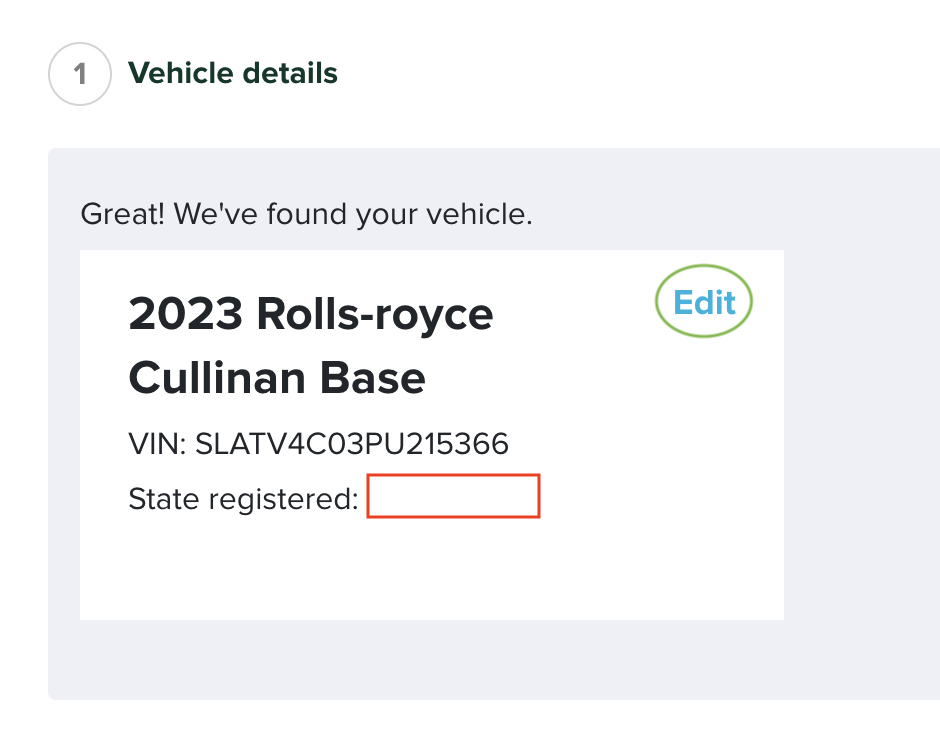
- Click "Edit" in the top right corner and enter the state your vehicle is registered in
- Fill out any additional missing details
- Click "Activate Listing" at the bottom
This will finalize your listing and set it live so you can experience the future of private party vehicle sales! Log in now to finish your listing.